The agent lives
on your machine.
OpenWorkit puts a persistent agent on the desktop you already work on. It reads the files you have open, runs commands in your own shell, and calls your tools over MCP — on-device, reviewable, reversible.
Free while in beta · no account required
Why on-device
A tool that works where your work already is.
Most AI tools ask you to move your work into them. OpenWorkit moves the agent to your work.
Local by default
Files, shell history and tool output stay on the machine. Every write is a diff you approve, and every run is replayable.
Any model, per agent
Claude, GPT, Gemini, or a local model through Ollama. Pin a different one to each agent instead of choosing once for the whole app.
Real tools, over MCP
Connect a Model Context Protocol server and the agent learns its tools immediately — databases, issue trackers, your own internal CLI.
Workspace
It edits, it runs, it shows its work.
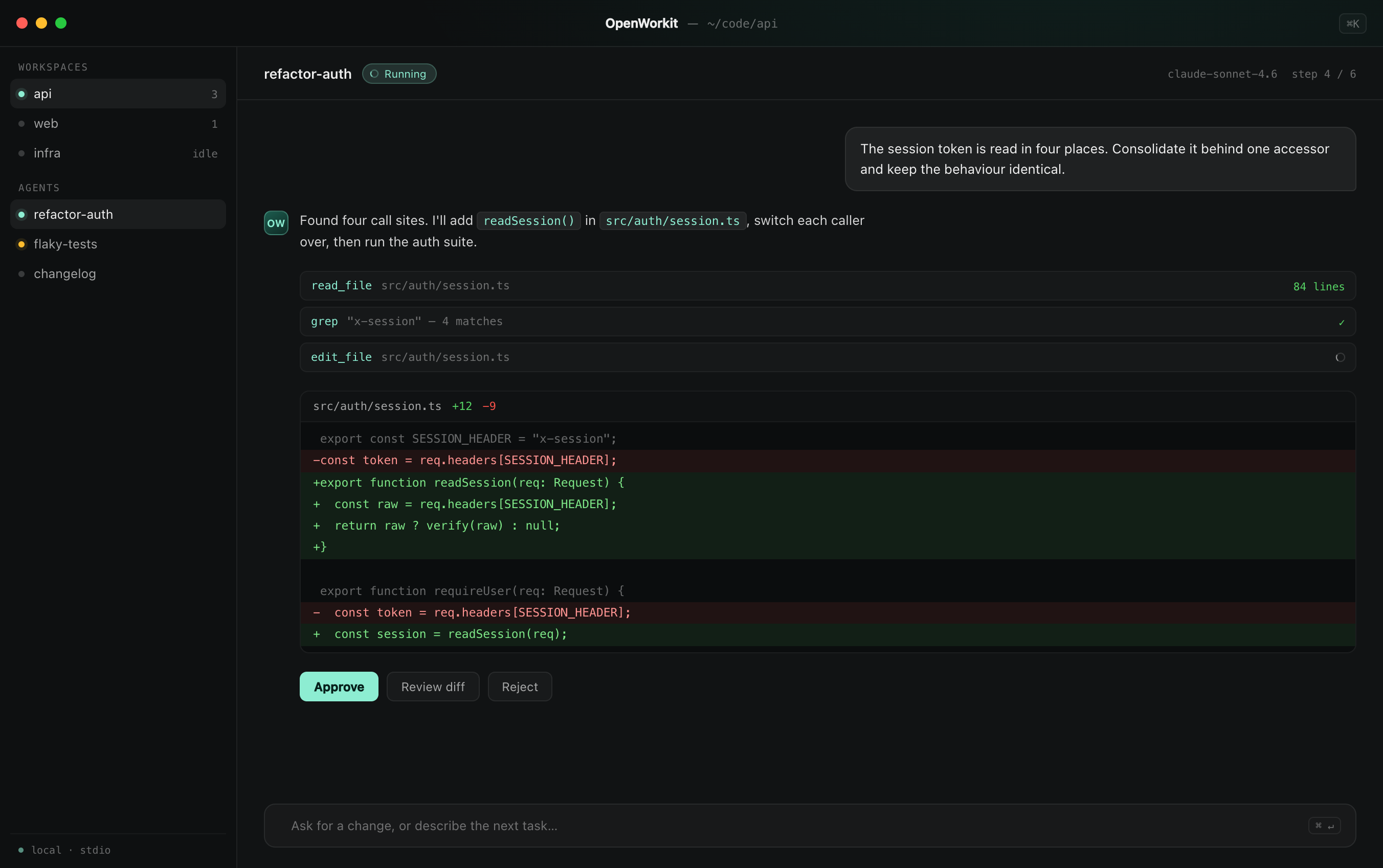
Nothing happens behind a spinner. Every file change arrives as a unified diff, every command runs in a shell session you can scroll back through, and the whole task can be rolled back in one step.
- Reviewable diffs before anything touches disk
- Terminal sessions with full scrollback and replay
- Per-workspace undo, down to a single hunk
diff · terminal · undo
❯ pnpm test --filter auth
✓ session.test.ts 12 passed
✓ guard.test.ts 8 passed
✗ refresh.test.ts 1 failed
- ttl = 60 * 60
+ ttl = config.sessionTtl
+ assert(ttl > 0)
Parallel
Four agents. One window.
Give each agent its own task, its own model and its own working directory. They run at the same time without sharing context, and you drop into whichever one needs a decision.
- Isolated contexts, so agents never cross-talk
- Queue work, then come back to finished diffs
- Keyboard-first: jump between agents with ⌘1–⌘9
parallel · isolated · queued
Extensibility
New abilities without a new release.
Point OpenWorkit at an MCP server and it picks up the tools you wrote this morning. Local stdio servers and remote ones both work, with permissions scoped per server.
- One-click install from the MCP registry
- stdio and streamable HTTP transports
- Per-server permissions and audit trail
mcp · stdio · http
Connects to
The tools are already on your machine.
Model providers on one side, MCP servers on the other. Add either without restarting.
Download
Install it in about a minute.
One signed binary, no runtime to install, no account to create. Your first agent is ready when the window opens.
brew install --cask openworkitHomebrew · macOS
Requires macOS 13+, Windows 10+ or a glibc 2.31+ Linux desktop.
Questions
The things people ask first.
If yours isn't here, open an issue on GitHub — there are no dumb questions while this is in beta.
Only the text the model needs to see, and only for the turn that needs it. File reads, shell output and diffs stay local; nothing is indexed, stored or used for training. Point an agent at a local model through Ollama and no request leaves at all.
Put an agent on the desktop you already use.
Download takes a minute. The first task takes about the same.